How EvoraVerb works
EvoraVerb is an algorithmic reverb plugin built around a feedback delay network. Two controls on the surface; eight delay lines, allpass diffusion and three-layer modulation underneath. This page explains what happens to your signal and how it differs from other reverbs.
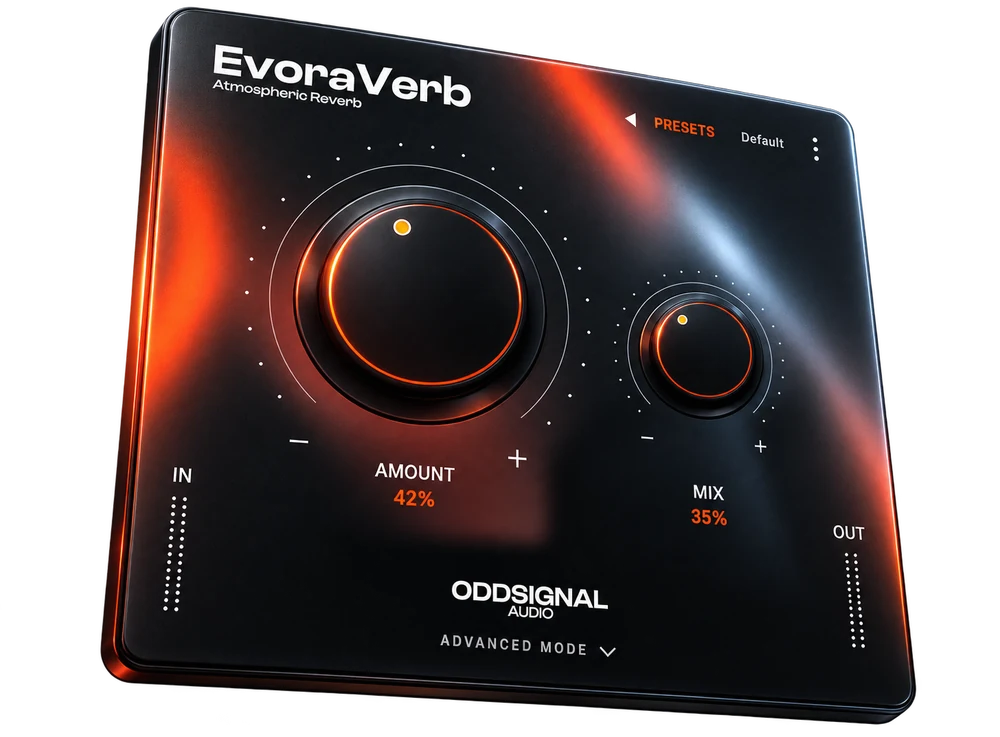
Simple mode: two controls
Most reverbs give you a dozen knobs and leave the coherent combinations for you to find. EvoraVerb takes the opposite approach: Amount is a macro that rescales six internal parameters at once, along a path where every position is a usable space.
| Internal parameter | At 0% | At 100% | What you hear |
|---|---|---|---|
| Size | 0.20 | 0.95 | Room dimensions |
| Decay | 0.8 s | 12.0 s | Tail length |
| Damping | 0.55 | 0.30 | Opens up in the highs as it grows |
| Pre-delay | 10 ms | 35 ms | Distance to the first reflection |
| Mod depth | 0.15 | 0.55 | Movement inside the tail |
| Width | 0.70 | 1.00 | Stereo spread |
Turning Amount takes you from a small controlled room to a long enveloping space in one gesture. Mix sets the wet and dry balance. Both are exposed to your host for automation.
Advanced mode
Open the advanced panel and Amount steps aside: instead of driving the six parameters through a macro, you set each one directly. Nothing fights for control, because Amount only writes to them while the panel is closed.
The defaults are exactly the values the macro produced at 50%, so opening the panel never changes the sound you already had.
| Control | Range | Default |
|---|---|---|
| Size | 0 – 100% | 57.5% |
| Decay | 0.1 – 12 s | 6.40 s |
| Damping | 0 – 100% | 42.5% |
| Pre-Delay | 0 – 120 ms | 22.5 ms |
| Modulation | 0 – 100% | 35% |
| Width | 0 – 100% | 85% |
Reverb EQ
Two filters shape the tail: a low cut and a high cut. Both act on the reverb alone and never touch your dry signal, so you can clear space in the low end or take the edge off the top without dulling the source.
They stay out of the macro on purpose. Amount describes the space; where you cut frequencies depends on the material you are treating, not on the size of the room.
| Filter | Range | Default |
|---|---|---|
| Low Cut | 10 Hz – 1.5 kHz | Off |
| High Cut | 100 Hz – 20 kHz | Off |
Input and output gain
Two trims sit next to the meters, each ranging from −24 to +24 dB, for matching levels without reaching for another plugin.
Typed values and your own presets
Version 1.2 added two things the beta asked for. Every control accepts a value typed in directly, for when you know you want 2.4 seconds rather than somewhere near it. And you can save your own presets alongside the twenty that ship with the plugin.
User presets are stored as files on your machine, so they survive reinstalling and can be copied between computers.
The signal chain
Each stage hands the next a wavefront that is already more scattered, so the feedback network never receives a dry impulse. It sustains and blurs a cloud that already exists, which is where the metallic character of cheaper reverbs comes from.
Pre-delay
True stereo: left and right travel down independent lines instead of being summed to mono, so the width of your source survives all the way to the tank. Third-order Lagrange interpolation, with 500 ms of headroom.
Early reflections
Eight taps per channel on separate lines, with deliberately irregular timings that differ between left and right so the image does not collapse to the centre in mono. Each bounce loses highs, the way a real wall behaves.
Allpass diffuser
Four allpass stages in series per channel, again with different times left and right. This is the stage that does most of the work removing the metallic quality: it turns the wavefront into a dense cloud before it ever reaches the tank.
FDN tank
Eight delay lines with mutually prime lengths, fed back through a Householder matrix that preserves energy and spreads every line into all the others. Left and right are injected separately per line, and the matrix itself blends the channels over time.
Damping and low-end control
Every line carries its own one-pole lowpass in the loop, each with a slightly different spectral deviation so the eight do not all decay with the same timbre. A second, very slow filter removes the DC component that would otherwise accumulate inaudibly and destabilise long tails.
What makes it different
Three-layer modulation
What gives away an artificial reverb on long tails is the periodic, predictable sway of a pure sine LFO. EvoraVerb combines three independent sources on every line:
| Layer | Frequency | Weight | Contributes |
|---|---|---|---|
| Main LFO | 0.15 – 0.64 Hz | 60% | Chorus-like movement |
| Slow drift | 0.021 – 0.112 Hz | 28% | Long-term breathing |
| Smoothed noise | Non-periodic | 12% | Breaks audible repetition |
Asymmetric by design
Reflection times, diffuser stages and output weights all differ between channels. Nothing is mirrored, so the stereo image stays open instead of pulling to the middle.
Built for real-time
No memory is allocated while audio is running — everything is reserved when the plugin is prepared. Every parameter is ramped, from 20 ms on Mix to 250 ms on Decay, so automation stays free of audible artefacts. Denormals are handled and the feedback loop carries a soft-clip safety limiter.
An interface that gets out of the way
Vector graphics, no bitmaps, at 512 × 512. It scales cleanly and stays readable next to the rest of your session.
Formats and system requirements
| Formats | VST3, Audio Unit, Standalone |
| Windows | Windows 10 or later, 64-bit |
| macOS | macOS 11.0 (Big Sur) or later — Intel and Apple Silicon |
| Modes | Simple (2 controls) and advanced (6 controls + EQ) |
| Reverb EQ | Low cut and high cut, wet signal only |
| Channels | Stereo in, stereo out only |
| Latency | 0 samples |
| Reported tail | 6.0 s |
| Maximum decay | 12 s |
| Processing | 32-bit floating point |
| Sample rate | Follows the host |
| MIDI | Not used |
| Automatable parameters | 12 |
| Session state | Saved with your project |
| Presets | 20 factory presets, plus your own |
| VST3 size | About 9.5 MB (Windows x64) |
| Version | 1.2.0 |
AAX is not included. It requires the Avid SDK and a PACE signature, neither of which is part of this build, so EvoraVerb does not run in Pro Tools yet.
Frequently asked questions
How do I get EvoraVerb?
EvoraVerb is sold through KVR Audio. Buying there gets you the VST3, the Audio Unit and the standalone application.
Which formats does it support?
VST3, Audio Unit and a standalone application. No AAX, so it does not load in Pro Tools.
Does it run on Apple Silicon?
Yes. The macOS build is a universal binary, so it runs natively on both Apple Silicon and Intel Macs, from macOS 11 onwards.
Does it add latency?
No. Reported latency is 0 samples, so nothing shifts in your session.
Can I use it on a mono track?
Not directly. EvoraVerb is stereo in, stereo out. For a mono source, put it on a stereo bus or a stereo send.
Why only two knobs?
That is only the simple mode. Amount moves six internal parameters along a path where every position is a usable space, so you can work fast without hunting for a good combination. When you need precision, the advanced panel gives you those six directly, plus the reverb EQ.
What sample rates does it support?
Whatever your host runs. Every delay length and filter coefficient is recalculated when the rate changes.
How long can the tail get?
Up to around 12 seconds of decay at maximum Amount.
From the blog
€19.99 €39.99 50% OFF